Pattern 3: Routing
Learn how to implement conditional routing in Microsoft Agent Framework, using LLM classification to direct requests to specialized agents for better response quality
Learning Objectives
By the end of this tutorial, you will be able to:
- Understand the Routing pattern and when to use it
- Implement custom
Executor<TIn, TOut>classes for classification - Build routing workflows with specialized agents
- Create specialist agents with domain-specific instructions
- Compare routing vs single-agent approaches
- Benchmark and evaluate response quality improvements
Prerequisites
Before starting this tutorial, ensure you have:
- .NET 10.0 SDK or later installed
- An LLM provider configured (see Setting Up the Agent Environment)
- Basic familiarity with Microsoft Agent Framework concepts
- Completed Pattern 1: Prompt Chaining recommended
Pattern Overview
What is Routing?
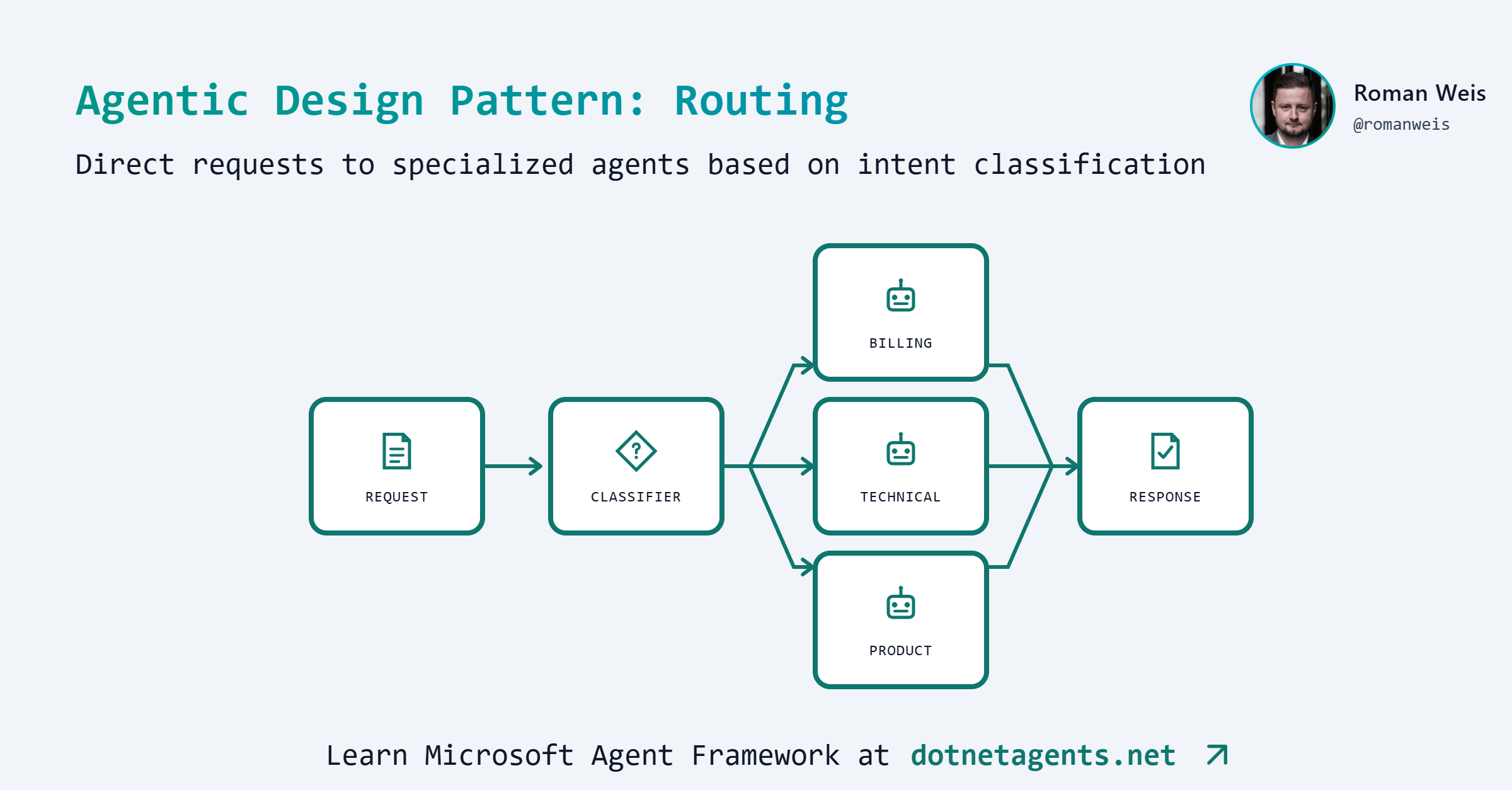
Routing is an agentic pattern where an LLM classifies incoming requests and routes them to specialized handlers. Think of it as a triage system where a classifier examines each request, determines its category, and delegates to the most appropriate expert.
flowchart TD
  A[Support Ticket] --> B[Classifier]
  B --> C{Classification}
  C -->|Billing| D[Billing Specialist]
  C -->|Technical| E[Technical Specialist]
  C -->|Account| F[Account Specialist]
  C -->|Product| G[Product Specialist]
  D --> H[Response]
  E --> H
  F --> H
  G --> H
Each specialist has focused instructions and domain expertise, making the overall system more accurate than a single generalist agent.
When to Use Routing
Use routing when:
- Requests fall into distinct categories with different handling needs
- Specialized knowledge improves response quality
- You need clear audit trails of classification decisions
- Different categories require different response formats or expertise
Avoid routing when:
- Categories overlap significantly
- A single generalist prompt suffices
- Classification adds unacceptable latency
- Request types are unpredictable
Real-world examples:
| Use Case | Categories |
|---|---|
| Customer Support | Billing, Technical, Account, Product |
| Content Moderation | Safe, Flagged, Escalate |
| Legal Document Triage | Contract, Litigation, Compliance, HR |
| IT Helpdesk | Network, Hardware, Software, Access |
Step-by-Step Implementation
Step 1: Clone the Patterns Repository
git clone https://github.com/dotnetagents/patterns.git
cd patterns/03-routing/src/Routing
Step 2: Configure Your LLM Provider
Set up your environment variables based on your provider. See Setting Up the Agent Environment for detailed instructions.
For Azure OpenAI:
export AZURE_OPENAI_ENDPOINT=https://your-resource.openai.azure.com/
export AZURE_OPENAI_API_KEY=your-key
Step 3: Define the Support Categories
First, define the categories your classifier will route to:
public enum SupportCategory
{
    Billing,
    Technical,
    Account,
    Product,
    General  // Fallback for unclassified requests
}

/// <summary>
/// Output from the classifier - contains the routing decision.
/// </summary>
public sealed record RoutingDecision
{
    public required SupportCategory Category { get; init; }
    public required string Reasoning { get; init; }
    public required string OriginalInput { get; init; }
}
The RoutingDecision record captures:
- Category: Where to route the request
- Reasoning: Why the classifier made this decision (useful for debugging)
- OriginalInput: The original request text for the specialist
Step 4: Build the Classifier Executor
The classifier is a custom executor that uses an LLM to categorize incoming requests:
public sealed class ClassifierExecutor : Executor<ChatMessage, RoutingDecision>
{
    private readonly IChatClient _chatClient;

    private const string ClassifierInstructions = """
        You are a customer support triage specialist. Your job is to analyze incoming
        support tickets and classify them into the appropriate category.

        Available categories:
        - billing: Payment issues, charges, refunds, subscription changes, invoicing
        - technical: Software bugs, error messages, API issues, integration problems
        - account: Password resets, account access, security concerns, profile changes
        - product: Feature questions, product information, capabilities, usage guidance

        Analyze the ticket carefully and determine the single best category.

        Respond in this exact XML format:
        <reasoning>
        [Your analysis of why this ticket belongs to a specific category]
        </reasoning>
        <selection>
        [category name in lowercase: billing, technical, account, or product]
        </selection>

        Only output the XML, nothing else.
        """;

    public ClassifierExecutor(string provider, string model)
        : base("Classifier")
    {
        _chatClient = ChatClientFactory.Create(provider, model);
    }

    public override async ValueTask<RoutingDecision> HandleAsync(
        ChatMessage message,
        IWorkflowContext context,
        CancellationToken cancellationToken = default)
    {
        var messages = new List<ChatMessage>
        {
            new(ChatRole.System, ClassifierInstructions),
            new(ChatRole.User, message.Text)
        };

        var response = await _chatClient.GetResponseAsync(messages,
            cancellationToken: cancellationToken);

        return ParseRoutingResponse(response.Text, message.Text);
    }

    private static RoutingDecision ParseRoutingResponse(string response, string originalInput)
    {
        var reasoning = ExtractXmlContent(response, "reasoning");
        var selection = ExtractXmlContent(response, "selection").Trim().ToLowerInvariant();

        var category = selection switch
        {
            "billing" => SupportCategory.Billing,
            "technical" => SupportCategory.Technical,
            "account" => SupportCategory.Account,
            "product" => SupportCategory.Product,
            _ => SupportCategory.General
        };

        return new RoutingDecision
        {
            Category = category,
            Reasoning = reasoning,
            OriginalInput = originalInput
        };
    }
}
Key design decisions:
- XML output format: More reliable parsing than free-form text
- Reasoning capture: Provides transparency into classification logic
- Fallback to General: Handles edge cases gracefully
Step 5: Create Specialist Executors
Each specialist has domain-specific instructions:
public sealed class SpecialistExecutor : Executor<RoutingDecision, ChatMessage>
{
    private readonly IChatClient _chatClient;
    private readonly string _instructions;

    public SpecialistExecutor(string provider, string model, SupportCategory category)
        : base($"{category}Specialist")
    {
        _chatClient = ChatClientFactory.Create(provider, model);
        _instructions = SpecialistInstructions.GetInstructions(category);
    }

    public override async ValueTask<ChatMessage> HandleAsync(
        RoutingDecision decision,
        IWorkflowContext context,
        CancellationToken cancellationToken = default)
    {
        var messages = new List<ChatMessage>
        {
            new(ChatRole.System, _instructions),
            new(ChatRole.User, decision.OriginalInput)
        };

        var response = await _chatClient.GetResponseAsync(messages,
            cancellationToken: cancellationToken);

        return new ChatMessage(ChatRole.Assistant, response.Text);
    }
}
Step 6: Define Specialist Instructions
Each specialist has focused instructions for their domain:
public static class SpecialistInstructions
{
    public const string Billing = """
        You are a billing specialist for a software company. You help customers with:
        - Payment issues and failed transactions
        - Refund requests and processing
        - Subscription upgrades, downgrades, and cancellations
        - Invoice questions and billing history
        - Pricing and plan comparisons

        Guidelines:
        - Always verify the nature of the billing issue before providing solutions
        - For refund requests, explain the refund policy (30-day money-back guarantee)
        - Offer to escalate complex billing disputes to the billing manager
        - Provide estimated processing times for any financial actions
        - Be empathetic about payment difficulties

        Respond professionally and provide clear, actionable steps.
        """;

    public const string Technical = """
        You are a senior technical support engineer. You help customers with:
        - Software bugs and error messages
        - API integration issues
        - Performance troubleshooting
        - Configuration problems
        - Compatibility questions

        Guidelines:
        - Ask clarifying questions about the environment (OS, version, etc.) if needed
        - Provide step-by-step troubleshooting instructions
        - Include relevant log file locations and debug commands
        - Suggest workarounds when immediate fixes aren't available
        - Reference documentation links where appropriate

        Be technical but clear. Include code examples when helpful.
        """;

    // ... Account, Product, General instructions
}
Step 7: Build the Routing Workflow with AddSwitch
Use the framework’s native AddSwitch() for conditional routing based on the classifier output:
public static class RoutingWorkflow
{
    public static (Workflow, Dictionary<string, string>) Create(RoutingPipelineConfig config)
    {
        // Create classifier executor (classifies tickets into categories)
        var classifier = new ClassifierExecutor(config.Provider, config.ClassifierModel);

        // Create specialist executors for each category
        var billing = new SpecialistExecutor(config.Provider, config.SpecialistModel,
            SupportCategory.Billing);
        var technical = new SpecialistExecutor(config.Provider, config.SpecialistModel,
            SupportCategory.Technical);
        var account = new SpecialistExecutor(config.Provider, config.SpecialistModel,
            SupportCategory.Account);
        var product = new SpecialistExecutor(config.Provider, config.SpecialistModel,
            SupportCategory.Product);
        var general = new SpecialistExecutor(config.Provider, config.SpecialistModel,
            SupportCategory.General);

        // Build workflow with switch-case routing
        var builder = new WorkflowBuilder(classifier);

        builder.AddSwitch(classifier, switchBuilder =>
            switchBuilder
                .AddCase<RoutingDecision>(r => r!.Category == SupportCategory.Billing, billing)
                .AddCase<RoutingDecision>(r => r!.Category == SupportCategory.Technical, technical)
                .AddCase<RoutingDecision>(r => r!.Category == SupportCategory.Account, account)
                .AddCase<RoutingDecision>(r => r!.Category == SupportCategory.Product, product)
                .AddCase<RoutingDecision>(_ => true, general) // Default case
        );

        var workflow = builder.Build();

        var agentModels = new Dictionary<string, string>
        {
            ["Classifier"] = config.ClassifierModel,
            ["BillingSpecialist"] = config.SpecialistModel,
            ["TechnicalSpecialist"] = config.SpecialistModel,
            ["AccountSpecialist"] = config.SpecialistModel,
            ["ProductSpecialist"] = config.SpecialistModel,
            ["GeneralSpecialist"] = config.SpecialistModel,
        };

        return (workflow, agentModels);
    }
}
Key elements:
AddSwitch(): Routes based on the classifier’s outputAddCase<RoutingDecision>(): Each case checks the category and routes to the appropriate specialist- Default case: Uses
_ => trueto catch any unmatched categories
Step 8: Create the Benchmark Class
Compare routing with a single generic agent:
[WorkflowBenchmark("routing",
    Prompt = SampleTickets.DefaultBenchmarkTicket,
    Description = "Customer support routing: classify and delegate to specialists")]
public class RoutingBenchmarks
{
    [BenchmarkLlm("single-agent", Baseline = true,
        Description = "Single generic support agent handles all requests")]
    public async Task<BenchmarkOutput> SingleAgent(string prompt)
    {
        var (workflow, models) = SingleAgentSupportPipeline.Create(config);
        var response = await WorkflowRunner.RunAsync(workflow, prompt);
        return BenchmarkOutput.WithModels(response, models);
    }

    [BenchmarkLlm("routing",
        Description = "Classifier routes to specialized agents")]
    public async Task<BenchmarkOutput> Routing(string prompt)
    {
        var (workflow, models) = RoutingWorkflow.Create(config);
        var response = await WorkflowRunner.RunAsync(workflow, prompt);
        return BenchmarkOutput.WithModels(response, models);
    }

    [BenchmarkLlm("routing-mini-classifier",
        Description = "Uses cheaper model for classification, full model for specialists")]
    public async Task<BenchmarkOutput> RoutingMiniClassifier(string prompt)
    {
        var (workflow, models) = RoutingWorkflow.Create(configWithMiniClassifier);
        var response = await WorkflowRunner.RunAsync(workflow, prompt);
        return BenchmarkOutput.WithModels(response, models);
    }
}
Routing vs Single-Agent Comparison
A key question: Is the complexity of routing worth it?
Single-Agent Approach (Baseline)
The single-agent approach uses one generic prompt with all categories:
var agent = new AgentExecutor(new AgentConfig
{
    Name = "GenericSupport",
    Provider = "azure",
    Model = "gpt-4.1",
    Instructions = """
        You are a customer support representative. Handle all inquiries including:
        - Billing: payments, refunds, subscriptions, invoicing, pricing
        - Technical: bugs, errors, API issues, integrations, performance
        - Account: passwords, access, security, profiles, 2FA
        - Product: features, capabilities, usage, onboarding

        Be helpful, professional, and provide actionable solutions.
        """
});
Trade-offs
| Approach | LLM Calls | Latency | Response Quality | Cost |
|---|---|---|---|---|
| Single Agent | 1 | Lower | Generic | Lower |
| Routing | 2 | Higher | Specialized | Higher |
| Routing (mini classifier) | 2 | Medium | Specialized | Medium |
When Routing Wins
Routing provides significant quality improvements when:
-
Deep domain knowledge matters: A billing specialist knows refund policies, processing times, and escalation paths that a generalist might miss.
-
Different tone is needed: Technical support should be precise with code examples; account security should be careful and thorough; billing should be empathetic.
-
Audit trails are required: The classification decision provides transparency into why a request was handled a certain way.
-
Categories have distinct workflows: Billing might need to reference pricing tiers; technical might need to ask about environment details.
Running the Benchmarks
cd patterns/03-routing/src/Routing

# List available benchmarks
dotnet run -- --list-benchmarks

# Run all routing benchmarks
dotnet run -- --benchmark

# Run with evaluation
dotnet run -- --benchmark --evaluate
Interactive Mode
Test with sample tickets:
dotnet run -- --provider azure --model gpt-4.1
The interactive mode shows:
- Demo tickets for each category
- Classification reasoning
- Specialist responses
Sample Tickets
The patterns repo includes test tickets for each category:
Billing Ticket:
Subject: Duplicate charge on my account

Hi, I was charged twice for my monthly subscription last week. I can see
two charges of $49.99 on my credit card statement dated December 28th.
My account number is AC-12345. Can you please refund the duplicate charge?
Technical Ticket:
Subject: 403 Forbidden error on API calls

I'm getting a 403 Forbidden error when trying to call your REST API from my
Node.js application. I've double-checked my API key and it looks correct.
The endpoint I'm hitting is /api/v2/users and I'm including the
Authorization header with "Bearer {api_key}".
Ambiguous Ticket (tests classifier judgment):
Subject: Account upgrade issue

My account shows I'm on the Basic plan but I upgraded to Pro last week
and was charged for it. Now I can't access the advanced features that
should come with Pro. Either I need a refund for the Pro upgrade or
you need to fix my account to show the correct plan.
Key Takeaways
-
Classification adds value: Domain-specific responses are often more helpful than generic ones.
-
Smaller models for classification: The classifier can use a cheaper model (like gpt-4o-mini) while specialists use the full model.
-
Audit trails are free: Capturing the reasoning provides transparency at no extra cost.
-
Graceful fallbacks: The General category handles edge cases without failing.
Exercises
Exercise 1: Add a New Category
Add a “Feedback” category for feature requests and suggestions. You’ll need to:
- Add to the
SupportCategoryenum - Add a
Feedbackspecialist instruction - Update the classifier prompt
- Add a sample ticket
Exercise 2: Try Different Classifier Models
Modify appsettings.json to use gpt-4o-mini for classification:
{
  "Routing": {
    "ClassifierModel": "gpt-4o-mini",
    "SpecialistModel": "gpt-4.1"
  }
}
Compare quality and cost.
Exercise 3: Multi-Category Handling
Some tickets (like the “Ambiguous” example) could benefit from multiple specialists. Implement a variant that:
- Detects multi-category tickets
- Consults multiple specialists
- Synthesizes a combined response
Summary
You have learned how to:
- Implement the Routing pattern for request classification
- Create custom executors for classification and specialist handling
- Build workflows that route based on LLM decisions
- Compare routing vs single-agent approaches
- Benchmark and evaluate response quality
Key insights:
- Routing improves response quality through specialization
- The trade-off is additional latency (2 LLM calls vs 1)
- Cost optimization is possible with smaller classifier models
- Audit trails provide valuable transparency
Next Steps
Continue your learning with these related patterns:
- Pattern 4: Model Context Protocol - Connect agents to external tools via MCP
Resources
Found this helpful?
Comments