Pattern 5: Parallelization
Learn the fan-out/fan-in pattern to run multiple AI agents concurrently, dramatically reducing latency while maintaining quality
Learning Objectives
By the end of this tutorial, you will be able to:
- Understand the fan-out/fan-in pattern and when to apply it
- Implement parallel agent execution with
WorkflowBuilder - Create the
FanOutExecutorandFanInExecutorcomponents - Build specialized agents with tool access
- Aggregate results from multiple agents into a cohesive output
Prerequisites
Before starting this tutorial, ensure you have:
- .NET 10.0 SDK installed
- An LLM provider configured (see Setting Up the Agent Environment)
- Completed Pattern 1: Prompt Chaining (for workflow basics)
- Completed Pattern 2: Tool Use (for tool integration)
What You’ll Build
In this tutorial, you’ll build a parallel travel planning system where multiple specialized agents research different aspects of a trip simultaneously, then aggregate their findings into a comprehensive travel plan.
The Scenario
Imagine planning a trip to Paris. Instead of a single agent handling all research sequentially, you deploy a team of specialists:
flowchart TB
  Q["Plan a 5-day trip to Paris"] --> FO[Fan-Out]
  FO --> H["Hotels Agent
(with Google Search)"]
  FO --> T["Transport Agent
(with Google Search)"]
  FO --> A["Activities Agent
(with Google Search)"]
  H --> FI[Fan-In]
  T --> FI
  A --> FI
  FI --> R["Comprehensive
Travel Plan"]

  style Q fill:#8b5cf6,color:#fff
  style R fill:#3b82f6,color:#fff
  style FO fill:#14b8a6,color:#fff
  style FI fill:#14b8a6,color:#fff
Each agent searches the web in real-time, and the aggregator combines their research into a cohesive itinerary. The key insight: all three agents run simultaneously, reducing total latency by ~3x compared to sequential execution.
Key Learning Points
Building this system will teach you:
- Fan-Out Pattern - Broadcasting a query to multiple agents simultaneously
- Fan-In Pattern - Collecting and aggregating results from parallel tasks
- WorkflowBuilder API - Using
AddFanOutEdgeandAddFanInEdgefor parallel orchestration - Executor Components - Creating custom executors to control workflow behavior
- Latency Optimization - When parallel execution provides significant benefits
Pattern Overview
What is Parallelization?
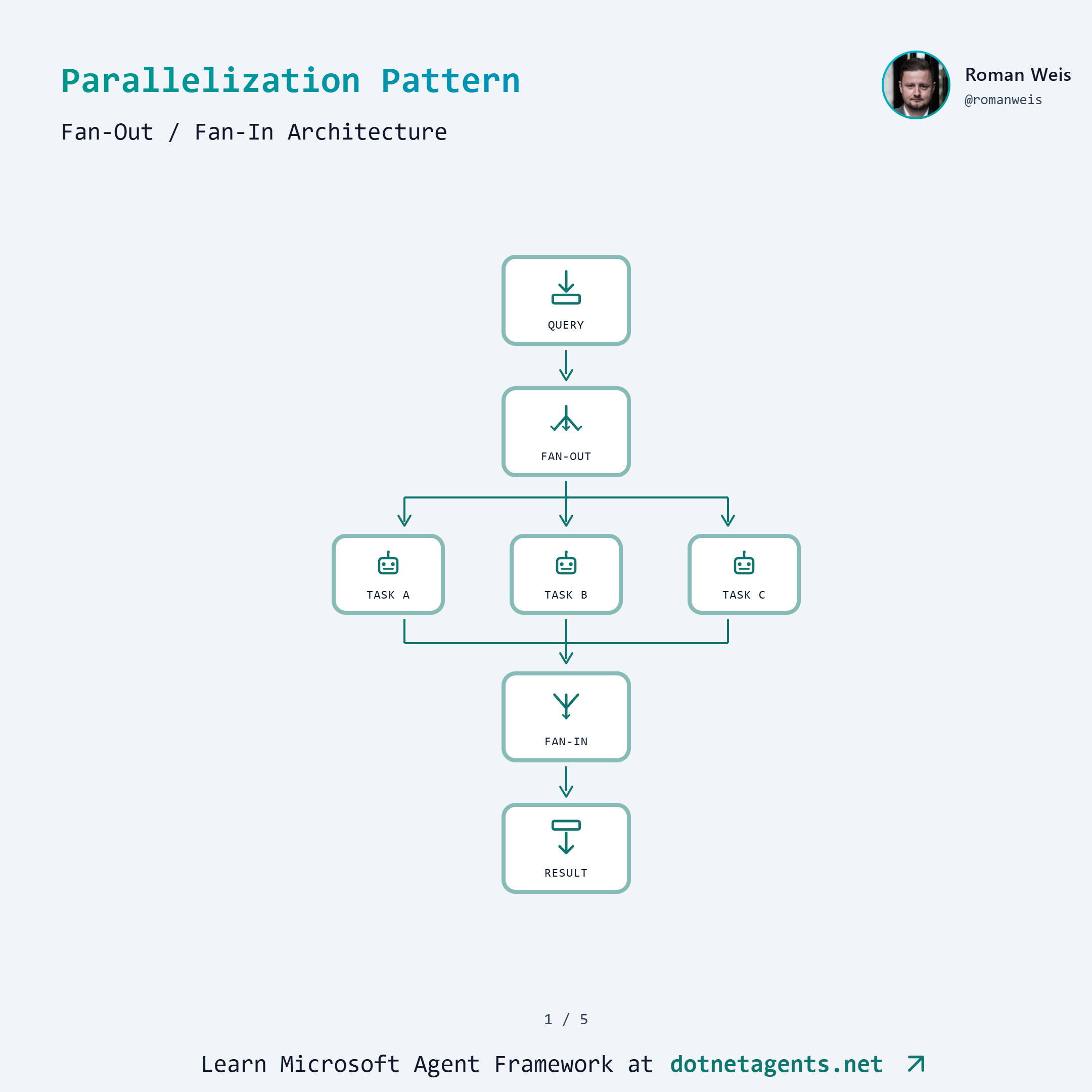
Parallelization is running multiple agent tasks concurrently rather than sequentially. The pattern consists of two phases:
- Fan-Out: A single input is broadcast to multiple agents that execute in parallel
- Fan-In: Results from all parallel agents are collected and synthesized
This is particularly powerful when:
- Tasks are independent (no dependencies between agents)
- Each task involves I/O-bound operations (API calls, LLM inference)
- Total latency matters more than individual task latency
When to Use Parallelization
Use parallel execution when:
- Multi-source research (querying multiple data sources simultaneously)
- Data aggregation (collecting and merging results from independent tasks)
- Parallel API calls (calling multiple external services at once)
- Independent subtasks (splitting work that doesn’t depend on each other)
Avoid parallel execution when:
- Tasks have dependencies (Task B needs output from Task A)
- Resources are constrained (shared rate limits, memory pressure)
- Order matters (sequential processing is semantically required)
Sequential vs Parallel Comparison
flowchart LR
  subgraph Sequential ["Sequential (AddEdge)"]
      S1[Hotels] --> S2[Transport] --> S3[Activities] --> S4[Aggregate]
  end

  subgraph Parallel ["Parallel (AddFanOutEdge)"]
      P0[Fan-Out] --> P1[Hotels]
      P0 --> P2[Transport]
      P0 --> P3[Activities]
      P1 --> P4[Fan-In]
      P2 --> P4
      P3 --> P4
  end
With sequential execution, total latency is the sum of all agent latencies. With parallel execution, total latency is approximately the maximum of any single agent (plus overhead).
Step-by-Step Implementation
Step 1: Get the Code
git clone https://github.com/dotnetagents/patterns.git
cd patterns/05-parallelization/src/Parallelization
Step 2: Explore the Project Structure
Parallelization/
├── Services/
│   ├── IGoogleSearchService.cs    # Search abstraction
│   ├── GoogleSearchService.cs     # Real Google API
│   └── MockGoogleSearchService.cs # Mock for testing
├── Tools/
│   └── GoogleSearchTool.cs        # LLM-callable search tool
├── UseCases/
│   └── TravelPlanning/
│       ├── TravelPlanningConfig.cs    # Configuration
│       ├── TravelAgentFactory.cs      # Creates specialized agents
│       ├── FanOutExecutor.cs          # Broadcasts to parallel agents
│       ├── FanInExecutor.cs           # Collects and synthesizes
│       ├── ParallelTravelPipeline.cs  # Parallel workflow
│       ├── SequentialTravelPipeline.cs # Baseline comparison
│       └── ParallelizationBenchmarks.cs
└── Program.cs
Step 3: Create Specialized Agents
Each parallel agent has a focused role and access to Google Search. The TravelAgentFactory creates these agents:
public static class TravelAgentFactory
{
    public const string HotelsAgentName = "HotelsAgent";
    public const string TransportAgentName = "TransportAgent";
    public const string ActivitiesAgentName = "ActivitiesAgent";

    public static readonly string[] ExpectedAgentNames =
        [HotelsAgentName, TransportAgentName, ActivitiesAgentName];

    private const string HotelsSystemPrompt = """
        You are a specialized travel agent focused on finding the best hotels.

        IMPORTANT: You MUST use the Search tool to find current hotel information.

        When given a travel query:
        1. FIRST, use the Search tool to find hotels in the destination
        2. Search for specific hotel types based on the traveler's needs
        3. Use multiple searches if needed for different hotel categories

        After searching, provide recommendations including:
        - 3-5 specific hotel recommendations with names and prices
        - Key features and amenities
        - Location benefits
        - Booking tips with links from search results
        """;

    // Similar prompts for Transport and Activities agents...

    public static ChatClientAgent CreateHotelsAgent(
        string provider, string model, IGoogleSearchService searchService)
        => Create(provider, model, HotelsSystemPrompt, HotelsAgentName, searchService);
}
Step 4: Wire Up Tools
Each agent gets the Google Search tool using AIFunctionFactory:
internal static ChatClientAgent Create(
    string provider,
    string model,
    string instructions,
    string name,
    IGoogleSearchService searchService)
{
    // Create the search tool
    var searchTool = new GoogleSearchTool(searchService);
    var tools = new List<AITool> { AIFunctionFactory.Create(searchTool.Search) };

    // Build client with automatic function invocation
    var chatClient = new ChatClientBuilder(ChatClientFactory.Create(provider, model))
        .UseFunctionInvocation()
        .Build();

    return new ChatClientAgent(chatClient, instructions, name, tools: tools);
}
The GoogleSearchTool wraps the search service as an LLM-callable function:
public class GoogleSearchTool(IGoogleSearchService searchService)
{
    [Description("Search the web for information using Google. Returns relevant " +
                 "search results with titles, descriptions, and links.")]
    public async Task<string> Search(
        [Description("The search query to find relevant information")] string query,
        [Description("Maximum number of results (default: 5, max: 10)")] int maxResults = 5)
    {
        var results = await searchService.SearchAsync(query, Math.Min(maxResults, 10));

        if (results.Count == 0)
            return "No search results found for the query.";

        var formattedResults = results.Select((r, i) =>
            $"{i + 1}. **{r.Title}**\n   {r.Snippet}\n   Link: {r.Link}");

        return string.Join("\n\n", formattedResults);
    }
}
Step 5: Build the FanOutExecutor
The FanOutExecutor receives the user’s query and broadcasts it to all connected parallel agents:
internal sealed class FanOutExecutor() : Executor<ChatMessage>("FanOutExecutor")
{
    public override async ValueTask HandleAsync(
        ChatMessage message,
        IWorkflowContext context,
        CancellationToken cancellationToken = default)
    {
        // Broadcast the query to all connected agents (Hotels, Transport, Activities)
        await context.SendMessageAsync(message, cancellationToken);

        // Send turn token to kick off all parallel agents simultaneously
        await context.SendMessageAsync(new TurnToken(emitEvents: true), cancellationToken);
    }
}
The TurnToken triggers all fan-out targets to begin processing at the same time.
Step 6: Build the FanInExecutor
The FanInExecutor collects results from all parallel agents and synthesizes them:
internal sealed class FanInExecutor : Executor<List<ChatMessage>, ChatMessage>
{
    private readonly Dictionary<string, ChatMessage> _agentResults = new();
    private readonly IChatClient _chatClient;
    private readonly HashSet<string> _expectedAgents;

    private const string SynthesisSystemPrompt = """
        You are an expert travel planner who creates comprehensive travel itineraries.

        You will receive research from three specialized agents:
        1. Hotels Agent - with accommodation recommendations
        2. Transport Agent - with flight and transportation options
        3. Activities Agent - with things to do and day plans

        Synthesize all research into a single, well-organized travel plan that:
        - Presents a coherent narrative, not just bullet points
        - Resolves any conflicts between recommendations
        - Creates a realistic, day-by-day itinerary
        - Includes practical logistics
        - Provides a budget estimate
        """;

    public override async ValueTask<ChatMessage> HandleAsync(
        List<ChatMessage> messages,
        IWorkflowContext context,
        CancellationToken cancellationToken = default)
    {
        // Collect results by agent name, filtering out tool call messages
        foreach (var msg in messages)
        {
            var agentName = msg.AuthorName;
            var hasToolContent = msg.Contents
                .Any(c => c is FunctionCallContent or FunctionResultContent);

            // Skip tool call messages and empty responses
            if (string.IsNullOrEmpty(agentName) || hasToolContent ||
                string.IsNullOrEmpty(msg.Text))
                continue;

            if (_expectedAgents.Contains(agentName))
                _agentResults[agentName] = msg;
        }

        // Wait until ALL expected agents have responded
        if (!_expectedAgents.All(a => _agentResults.ContainsKey(a)))
            return null!;  // Keep waiting for more results

        // All agents responded - synthesize into final plan
        var researchSummary = string.Join("\n\n---\n\n",
            _agentResults.Values.Select(m =>
                $"## Research from {m.AuthorName}\n\n{m.Text}"));

        var synthesisPrompt = $"""
            Synthesize this travel research into a comprehensive travel plan:

            {researchSummary}

            Create a cohesive itinerary combining the best recommendations.
            """;

        var chatMessages = new List<ChatMessage>
        {
            new(ChatRole.System, SynthesisSystemPrompt),
            new(ChatRole.User, synthesisPrompt)
        };

        var response = await _chatClient.GetResponseAsync(
            chatMessages, cancellationToken: cancellationToken);

        return new ChatMessage(ChatRole.Assistant, response.Text ?? string.Empty)
        {
            AuthorName = "Aggregator"
        };
    }
}
Key design decisions:
- Filtering tool messages: Tool call/result messages are skipped; only final agent outputs are collected
- Waiting for all agents: The executor returns
nulluntil all expected agents have responded - Synthesis prompt: Combines all research and asks the aggregator LLM to create a unified plan
Step 7: Assemble the Parallel Workflow
The ParallelTravelPipeline wires everything together using WorkflowBuilder:
public static class ParallelTravelPipeline
{
    public static (Workflow Workflow, Dictionary<string, string> AgentModels) Create(
        TravelPlanningConfig config,
        IGoogleSearchService searchService)
    {
        // Create specialized agents
        var hotelsAgent = TravelAgentFactory.CreateHotelsAgent(
            config.Provider, config.HotelsModel, searchService);
        var transportAgent = TravelAgentFactory.CreateTransportAgent(
            config.Provider, config.TransportModel, searchService);
        var activitiesAgent = TravelAgentFactory.CreateActivitiesAgent(
            config.Provider, config.ActivitiesModel, searchService);

        // Create executors
        var fanOutExecutor = new FanOutExecutor();
        var fanInExecutor = new FanInExecutor(
            ChatClientFactory.Create(config.Provider, config.AggregatorModel),
            config.AggregatorModel,
            TravelAgentFactory.ExpectedAgentNames);

        // Build workflow with Fan-Out/Fan-In pattern
        var workflow = new WorkflowBuilder(fanOutExecutor)
            .AddFanOutEdge(fanOutExecutor,
                targets: [hotelsAgent, transportAgent, activitiesAgent])
            .AddFanInEdge(
                [hotelsAgent, transportAgent, activitiesAgent],
                fanInExecutor)
            .WithOutputFrom(fanInExecutor)
            .Build();

        return (workflow, agentModels);
    }
}
The key API methods:
AddFanOutEdge(source, targets)- Routes output from source to multiple targets in parallelAddFanInEdge(sources, target)- Collects outputs from multiple sources into a single targetWithOutputFrom(executor)- Designates which executor produces the final workflow output
Step 8: Run the Travel Planner
# Configure environment (see Setting Up the Agent Environment)
# Set AZURE_OPENAI_API_KEY and AZURE_OPENAI_ENDPOINT

# Run interactively
dotnet run

# Or run benchmarks
dotnet run -- --benchmark
Try queries like:
- “Plan a 5-day trip to Paris in June”
- “Plan a budget weekend getaway to Barcelona”
- “Plan a family vacation to Tokyo with kids”
How It Works
When you submit “Plan a 5-day trip to Paris”, here’s the execution flow:
- FanOutExecutor receives the query and broadcasts it to all three agents
- Hotels, Transport, and Activities agents execute in parallel, each:
- Calling Google Search multiple times
- Analyzing results
- Generating recommendations
- FanInExecutor collects results as they arrive, waiting for all three
- Once all agents respond, FanInExecutor synthesizes a comprehensive travel plan
- The final plan is returned to the user
The parallelization happens automatically via the workflow engine - you don’t manage threads or async coordination manually.
Sequential Baseline
For comparison, here’s how the sequential pipeline is structured:
// Sequential: Hotels → Transport → Activities → Aggregator
var workflow = new WorkflowBuilder(hotelsAgent)
    .AddEdge(hotelsAgent, transportAgent)
    .AddEdge(transportAgent, activitiesAgent)
    .AddEdge(activitiesAgent, aggregationExecutor)
    .WithOutputFrom(aggregationExecutor)
    .Build();
Each agent waits for the previous one to complete before starting. This is simpler but ~3x slower for I/O-bound tasks.
Common Pitfalls
1. Not Waiting for All Agents
The FanInExecutor must wait until all expected agents have responded before synthesizing. Returning early produces incomplete results.
// Correct: Wait for all agents
if (!_expectedAgents.All(a => _agentResults.ContainsKey(a)))
    return null!;  // Keep waiting
2. Forgetting to Filter Tool Messages
Agents using tools produce multiple messages (function calls, function results, final response). Only the final text response should be aggregated.
var hasToolContent = msg.Contents
    .Any(c => c is FunctionCallContent or FunctionResultContent);

if (hasToolContent)
    continue;  // Skip tool messages
3. Shared State Between Parallel Agents
Each parallel agent should be independent. Avoid sharing mutable state between agents, as execution order is non-deterministic.
4. Over-Parallelization
More parallel agents isn’t always better. Consider:
- API rate limits (all agents hitting the same service)
- Token costs (more agents = more LLM calls)
- Aggregation complexity (synthesizing 10 agents is harder than 3)
5. Using Executors as Fan-In Sources
The AddFanInEdge method only works with ChatClientAgent instances, not Executor classes. If you try to use an Executor as a source for fan-in, the workflow won’t collect results properly.
// WRONG: Executors don't work as fan-in sources
var executor1 = new MyExecutor();
var executor2 = new MyExecutor();
workflow.AddFanInEdge([executor1, executor2], fanInExecutor);  // Won't work!

// CORRECT: Use ChatClientAgent instances
var agent1 = new ChatClientAgent(client, instructions, "Agent1");
var agent2 = new ChatClientAgent(client, instructions, "Agent2");
workflow.AddFanInEdge([agent1, agent2], fanInExecutor);  // Works!
This is why the travel planning example uses ChatClientAgent for all parallel tasks (Hotels, Transport, Activities) rather than custom Executor classes.
Try It Yourself
- Add a Budget Agent: Create a 4th agent that researches costs and provides budget breakdowns
- Implement Timeout Handling: Add a timeout to
FanInExecutorthat proceeds with partial results if an agent is slow - Try Different Model Combinations: Use GPT-4o-mini for research agents and GPT-4 only for aggregation
- Add Error Recovery: Handle cases where an agent fails (e.g., search API down)
Summary
You learned how to:
- Implement the fan-out/fan-in pattern for parallel agent execution
- Build
FanOutExecutorto broadcast queries to multiple agents - Build
FanInExecutorto collect and synthesize results - Use
AddFanOutEdgeandAddFanInEdgewithWorkflowBuilder - Create specialized agents with tool access for real-time research
The parallelization pattern is essential for I/O-bound multi-agent systems where latency matters.
Next Steps
- Pattern 6: Reflection - Agents that critique and improve their own outputs
- Explore the complete code on GitHub
Resources
Found this helpful?
Comments