Pattern 2: Tool Use
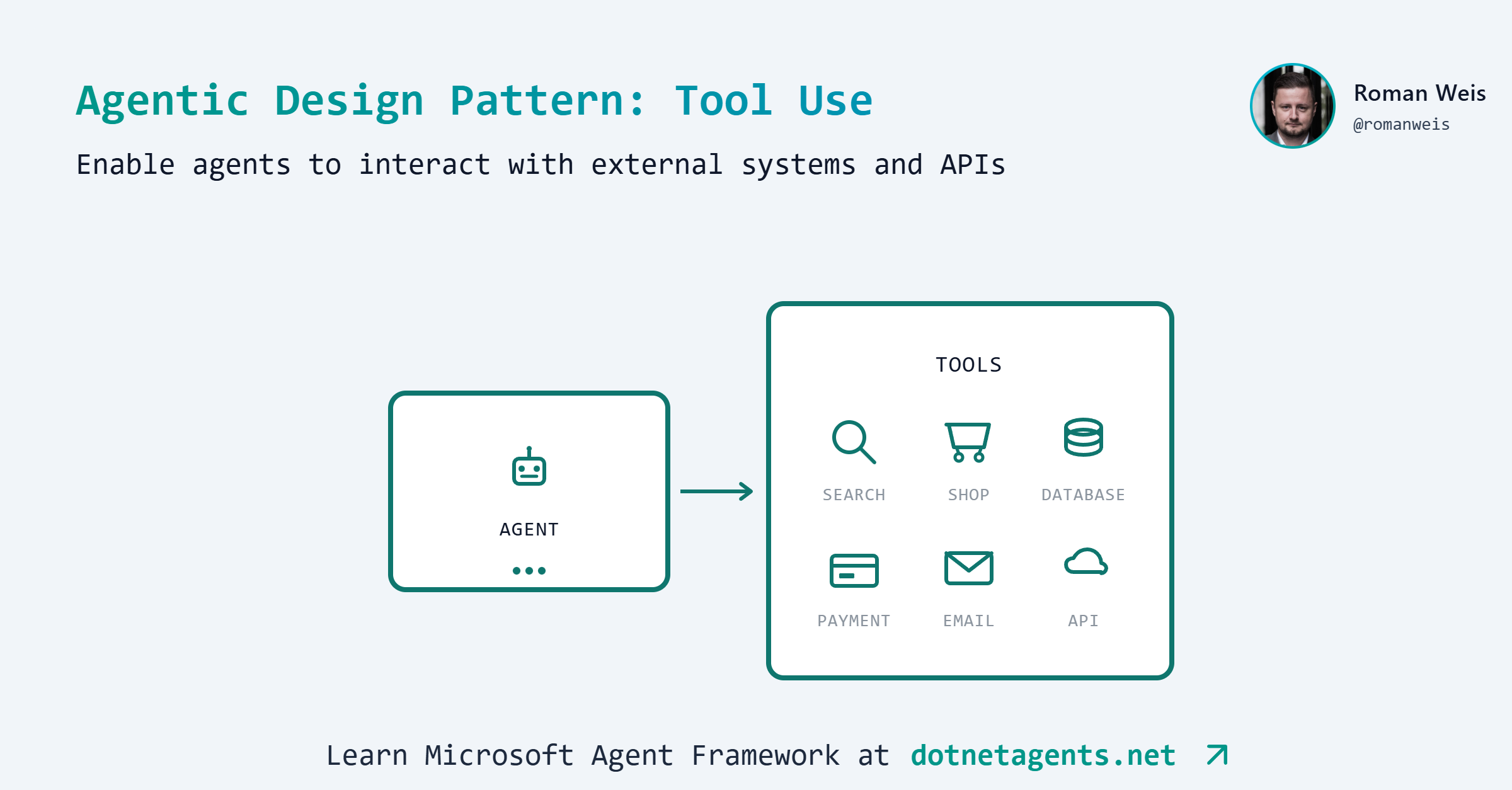
Learn how to give AI agents the ability to call external functions and APIs, enabling them to interact with databases, services, and real-world systems
Learning Objectives
By the end of this tutorial, you will be able to:
- Understand the Tool Use pattern and when to apply it
- Define tools using
[Description]attributes andAIFunctionFactory - Return strongly-typed C# objects from tools (automatic JSON serialization)
- Configure agents with multiple tools using
ChatClientBuilder - Handle circular references in Entity Framework models
Prerequisites
Before starting this tutorial, ensure you have:
- .NET 10.0 SDK installed
- An LLM provider configured (see Setting Up the Agent Environment)
- Basic familiarity with Entity Framework Core
- Completed Pattern 1: Prompt Chaining (recommended)
What You’ll Build
In this tutorial, you’ll build an AI-powered shopping assistant for an e-commerce store. The assistant can have natural conversations with customers while performing real actions like searching products, managing a shopping cart, and processing orders.
The Scenario
Imagine a customer visiting an online store and chatting with an AI assistant:
Customer: "I'm looking for programming books under $50"
Assistant: [searches database] "I found 3 books in your price range:
           - Clean Code ($39.99)
           - C# in Depth ($44.99)
           - Design Patterns ($54.99) - slightly over budget"

Customer: "Add Clean Code to my cart"
Assistant: [updates cart] "Done! Clean Code has been added. Your cart total is $39.99"

Customer: "Actually, add the C# book too and checkout"
Assistant: [updates cart, processes order] "Added C# in Depth. Order #1 placed!
           Total: $84.98. Thank you for your purchase!"
Without tools, the AI could only talk about shopping. With tools, it can actually do the shopping.
Architecture Overview

Sample Data
The store comes pre-loaded with 10 products across 3 categories:
| Category | Products |
|---|---|
| Electronics | Wireless Headphones ($149.99), USB-C Hub ($49.99), Mechanical Keyboard ($129.99), Portable Charger ($39.99) |
| Clothing | Cotton T-Shirt ($24.99), Denim Jeans ($59.99), Running Shoes ($89.99) |
| Books | C# in Depth ($44.99), Clean Code ($39.99), Design Patterns ($54.99) |
Key Learning Points
Building this assistant will teach you:
- Tool Definition - How to expose C# methods as AI-callable tools using
[Description]attributes - Tool Registration - How to wire tools into the agent using
AIFunctionFactory - Automatic Invocation - How the framework handles tool calling without manual intervention
- Returning Objects - How to return strongly-typed C# objects that get automatically serialized
- Stateful Operations - How tools can maintain state (shopping cart) across conversation turns
Pattern Overview
What is Tool Use?
Tool Use (also called Function Calling) allows AI agents to invoke external functions during a conversation. Instead of relying solely on training data, the agent can query databases, call APIs, perform calculations, or interact with any system you expose as a tool.
The LLM decides which tool to call based on the user’s request, the system automatically executes the tool, and the result is incorporated into the response.
When to Use Tool Use
Use tools when the agent needs to:
- Access real-time or dynamic data (databases, APIs)
- Perform precise calculations
- Take actions with side effects (add to cart, send email)
- Retrieve information outside the model’s training data
Avoid tools when:
- The task requires only reasoning/generation
- Data can be included in the prompt (small, static datasets)
- Latency is critical (each tool call adds overhead)
Step-by-Step Implementation
Step 1: Get the Code
git clone https://github.com/dotnetagents/patterns.git
cd patterns/02-tool-use/src/ToolUse
Step 2: Explore the Project Structure
ToolUse/
├── Data/
│   ├── ECommerceDbContext.cs    # EF Core database context
│   └── DbInitializer.cs         # Seeds sample products
├── Models/
│   ├── Product.cs, Category.cs  # Product catalog
│   ├── ShoppingCart.cs          # Cart with items
│   └── Order.cs                 # Completed orders
├── Services/
│   ├── ProductService.cs        # Product queries
│   ├── CartService.cs           # Cart operations
│   └── OrderService.cs          # Order processing
├── Tools/
│   ├── ProductFilteringTool.cs  # Search & browse tools
│   ├── ShoppingCartTool.cs      # Cart management tools
│   └── CheckoutTool.cs          # Order tools
└── Program.cs                   # Interactive CLI
Step 3: Understand the Domain Models
The shopping assistant works with these core entities:
public class Product
{
    public int Id { get; set; }
    public required string Name { get; set; }
    public required string Description { get; set; }
    public decimal Price { get; set; }
    public int Stock { get; set; }
    public Category Category { get; set; } = null!;
}

public class ShoppingCart
{
    public required string CustomerId { get; set; }
    public ICollection<CartItem> Items { get; set; } = [];
    public decimal Total => Items.Sum(i => i.Product.Price * i.Quantity);
}
Step 4: Define Tools with Description Attributes
This is the core of the Tool Use pattern. Tools are regular C# methods decorated with [Description] attributes that tell the LLM what each tool does.
Product Search Tool - Read-only queries:
public class ProductFilteringTool(ProductService productService)
{
    [Description("Search and filter products by name, category, or price range. " +
                 "Returns product details including ID, name, price, and availability.")]
    public async Task<IEnumerable<Product>> SearchProducts(
        [Description("Optional search term to filter by product name")] string? searchTerm = null,
        [Description("Category name: 'Electronics', 'Clothing', or 'Books'")] string? category = null,
        [Description("Minimum price filter")] decimal? minPrice = null,
        [Description("Maximum price filter")] decimal? maxPrice = null)
    {
        return await productService.SearchProductsAsync(
            searchTerm, category, minPrice, maxPrice);
    }
}
Shopping Cart Tool - Stateful mutations:
public class ShoppingCartTool(CartService cartService, string customerId)
{
    [Description("Add a product to the shopping cart. Returns the result with updated cart total.")]
    public async Task<CartOperationResult> AddToCart(
        [Description("The product ID to add")] int productId,
        [Description("Quantity to add (default: 1)")] int quantity = 1)
    {
        return await cartService.AddToCartAsync(customerId, productId, quantity);
    }

    [Description("View current shopping cart contents and total.")]
    public async Task<ShoppingCart?> ViewCart()
    {
        return await cartService.GetCartAsync(customerId);
    }
}
Checkout Tool - Completing the transaction:
public class CheckoutTool(OrderService orderService, CartService cartService, string customerId)
{
    [Description("Complete checkout and create an order from the shopping cart.")]
    public async Task<Order?> Checkout()
    {
        var cart = await cartService.GetCartAsync(customerId);
        if (cart == null || !cart.Items.Any())
            return null;

        var order = await orderService.CreateOrderAsync(customerId, cart);
        if (order != null)
            await cartService.ClearCartAsync(customerId);

        return order;
    }
}
Step 5: Register Tools with the Agent
Convert your methods into AI-callable tools using AIFunctionFactory, then enable automatic function invocation:
// Create tool instances with their dependencies
var productTool = new ProductFilteringTool(productService);
var cartTool = new ShoppingCartTool(cartService, customerId);
var checkoutTool = new CheckoutTool(orderService, cartService, customerId);

// Register each method as a tool
var tools = new List<AITool>
{
    AIFunctionFactory.Create(productTool.SearchProducts),
    AIFunctionFactory.Create(productTool.GetCategories),
    AIFunctionFactory.Create(cartTool.AddToCart),
    AIFunctionFactory.Create(cartTool.RemoveFromCart),
    AIFunctionFactory.Create(cartTool.ViewCart),
    AIFunctionFactory.Create(checkoutTool.Checkout),
};

// Build the client with automatic function invocation
var client = new ChatClientBuilder(ChatClientFactory.Create(model))
    .UseFunctionInvocation()  // This handles the tool call loop automatically
    .Build();

var options = new ChatOptions { Tools = tools };
Step 6: Create the Conversation Loop
The agent maintains context across turns, allowing multi-step interactions:
var messages = new List<ChatMessage>
{
    new(ChatRole.System, "You are a helpful shopping assistant...")
};

while (true)
{
    var input = Console.ReadLine();
    messages.Add(new(ChatRole.User, input));

    // The client automatically calls tools as needed
    await foreach (var chunk in client.GetStreamingResponseAsync(messages, options))
    {
        Console.Write(chunk.Text);
    }

    // Add response to history for context
    var response = await client.GetResponseAsync(messages, options);
    messages.Add(new(ChatRole.Assistant, response.Text));
}
Step 7: Run the Shopping Assistant
dotnet run -- --model gpt-4o
Try these prompts:
- “What books do you have under $50?”
- “Add Clean Code to my cart”
- “What’s in my cart?”
- “Checkout”
How It Works
When you ask “What books do you have under $50?”, here’s what happens:
- LLM receives your question + the tool descriptions
- LLM decides to call
SearchProducts(category: "Books", maxPrice: 50) - Framework executes the tool and gets JSON results
- LLM formats the results into a natural response
The UseFunctionInvocation() middleware handles steps 2-3 automatically - you don’t write any tool-calling logic yourself.
Common Pitfalls
1. Missing or Vague Descriptions
Bad: [Description("Get data")]
Good: [Description("Search products by name, category, or price range. Returns product details including ID, name, price.")]
2. Too Many Tools
More than 10-15 tools can confuse the model. Group related functions or use routing patterns.
3. Not Handling Errors Gracefully
Always return user-friendly error messages from tools, not exceptions.
4. Circular References in Entity Framework Models
When returning EF Core entities directly from tools, circular navigation properties will break JSON serialization. The AIFunctionFactory serializes return values to JsonElement, and circular references cause infinite loops.
Problem: Product → Category → Products → Product…
public class Product
{
    public Category Category { get; set; }  // Navigation property
}

public class Category
{
    public ICollection<Product> Products { get; set; }  // Back-reference creates cycle!
}
Solution: Add [JsonIgnore] to back-reference navigation properties:
using System.Text.Json.Serialization;

public class Category
{
    public required string Name { get; set; }

    [JsonIgnore]  // Breaks the cycle
    public ICollection<Product> Products { get; set; } = [];
}
This allows Product.Category to serialize (showing category details) while preventing the infinite loop back to products.
Benchmark Results
I benchmarked the shopping assistant with the prompt: “Search for C# books in the shop, if you find one under $50 then buy it.”
This tests multi-step reasoning: the agent must search products, identify a matching book, add it to cart, and complete checkout—all without user intervention.
Model Comparison
| Model | Tokens | LLM Calls | Latency | Quality |
|---|---|---|---|---|
| GPT-4.1 | 2,739 | 3 | 4,850ms | 5.0/5 |
| GPT-4o-mini | 2,741 | 3 | 2,343ms | 5.0/5 |
Both models successfully completed the task with identical tool call sequences (SearchProducts → AddToCart → Checkout).
GPT-4.1 Response
I found a C# book under $50: "C# in Depth" by Jon Skeet for $44.99.
I've purchased it for you.

Order details:
- Book: C# in Depth
- Price: $44.99
- Quantity: 1

If you need anything else, just let me know!

✓ Order #1 verified: C# in Depth purchased for $44.99
GPT-4o-mini Response
I found the book "C# in Depth" priced at $44.99 and successfully
purchased it for you.

- Order ID: 1
- Total: $44.99
- Order Date: December 31, 2025

If you need any further assistance, feel free to ask!

✓ Order #1 verified: C# in Depth purchased for $44.99
Analysis
Both models achieved perfect scores on task completion. Key differences:
- GPT-4o-mini is ~2x faster (2.3s vs 4.9s) at half the cost
- GPT-4.1 provides slightly warmer, more conversational tone
- GPT-4o-mini includes more structured metadata (Order ID, Date)
For tool-use patterns where task completion matters more than prose quality, GPT-4o-mini offers excellent value.
Try It Yourself
- Add a Wishlist Tool: Create
AddToWishlistandViewWishlisttools - Add Product Reviews: Create a tool to fetch and display product reviews
- Implement Coupons: Add a tool to apply discount codes at checkout
Summary
You learned how to:
- Define tools with
[Description]attributes - Return strongly-typed C# objects from tools
- Handle EF Core circular references with
[JsonIgnore] - Register tools using
AIFunctionFactory.Create() - Configure agents with
ChatClientBuilder.UseFunctionInvocation()
Next Steps
- Pattern 3: Routing - Direct queries to specialized agents
- Pattern 4: Model Context Protocol - Connect agents to external tools via MCP
Resources
Found this helpful?
Comments